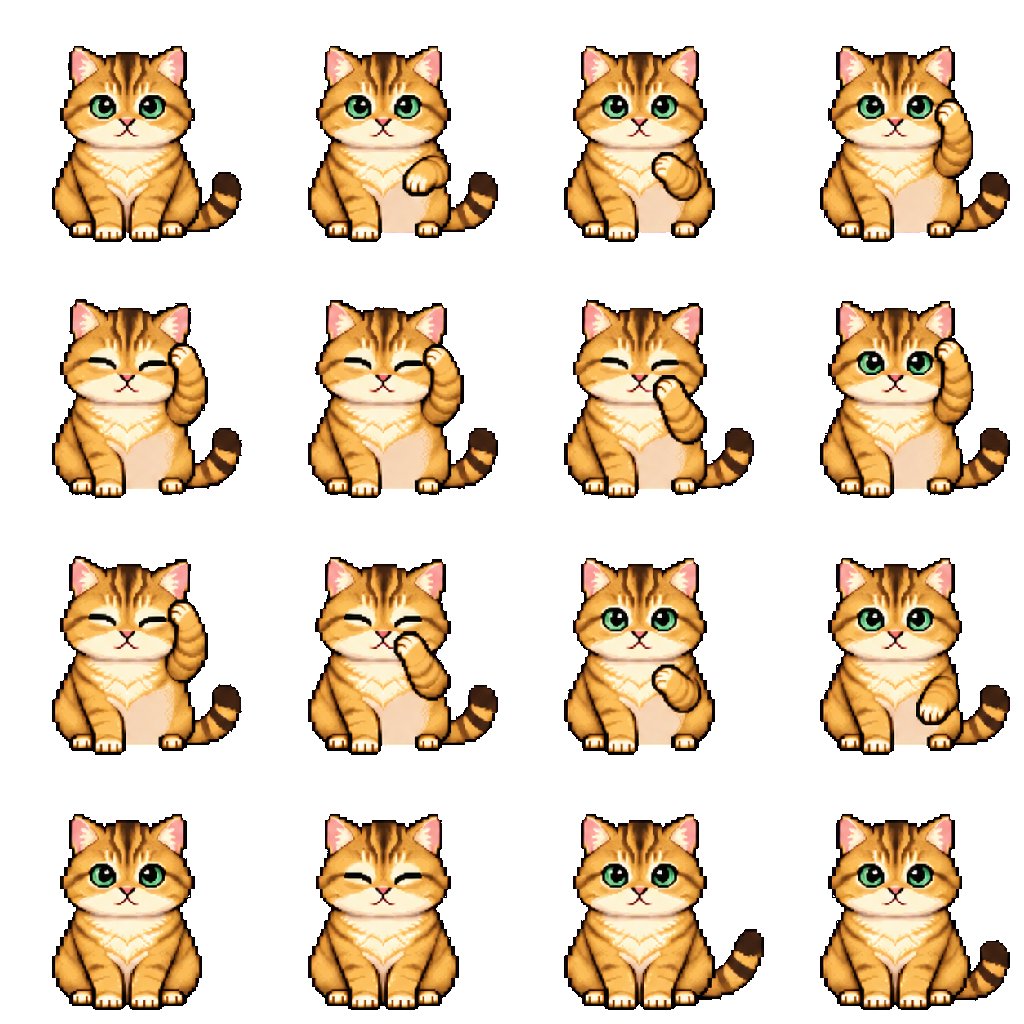
Turn the pet in my uploaded reference image into an adorable pixel-art sprite with a subtle, seamless looping animation.
PET REFERENCE
Use the uploaded image as the visual reference. Preserve the pet’s species, recognizable colors, markings, body shape, eye color, and distinctive features, including any visible accessories.
Adapt the pet into cute chibi proportions while keeping its natural anatomy recognizable. Preserve species-appropriate legs, paws, wings, fins, tails, ears, shells, or other features. Do not add limbs or features the animal does not have. Do not turn the pet into a human-shaped character or default to a cat-like design.
If the reference is cropped, infer the missing body details naturally from the visible animal. If multiple pets appear, use the most prominent pet unless I specify otherwise.
STYLE
Create crisp, charming pixel art with clearly defined square pixels, clean outlines, gentle shading, and a cohesive limited palette.
Use expressive features appropriate to the animal.
No blurry edges, smooth vector styling, photorealistic rendering, or anti-aliased outlines.
POSE AND ANIMATION
Create 16 consecutive frames of one gentle, species-appropriate idle animation.
Choose a comfortable resting, standing, perched, or hovering pose that suits this pet’s anatomy. Prefer a front-facing or slight three-quarter view that shows its recognizable features.
Include:
- A subtle breathing or resting motion appropriate to the species.
- One small secondary motion, such as an ear twitch, tail sway, feather settling, antenna movement, or gentle fin movement.
- One brief natural blink only if the species has movable eyelids.
Choose only movements that make sense for this animal. Animals without movable eyelids must not blink. Do not force paw gestures, sitting poses, or mammal-like expressions onto other species.
Keep the animation restrained and readable:
- Keep the pet in the same position.
- Anchor feet or other contact points for grounded animals.
- For swimming or hovering animals, keep the body centered with minimal drift.
- Keep the anatomy, markings, accessories, proportions, camera angle, and scale consistent.
- No walking, turning, large gestures, camera movement, or scene changes.
- Make the last frame transition smoothly back to the first.
SPRITE SHEET
Arrange the 16 frames in exactly 4 columns × 4 rows, ordered left to right, top to bottom.
Canvas: 1024 × 1024 pixels.
Each cell: 256 × 256 pixels.
Use identical alignment, a fixed body anchor, and a consistent baseline across all cells.
Choose a scale that accommodates the pet’s widest animation pose.
Keep the entire pet inside each cell, with at least 16 pixels of transparent padding on every side, including around moving tails, wings, fins, ears, and accessories.
These are consecutive frames of the SAME pet, not separate character variations.
No overlapping cells, grid lines, labels, text, or watermarks.
TRANSPARENCY
Use a genuinely transparent RGBA background with alpha zero outside the pet.
Do not draw a checkerboard or add a solid background, scenery, floor, water, or cast shadow.
Preserve white and pale details inside the pet.
If background removal is necessary, use a careful foreground mask. Do not globally erase a color that also appears in the pet’s body, markings, or accessories.
DELIVERABLES
Complete the actual files, not just instructions:
1. A transparent 4 × 4 PNG sprite sheet at 1024 × 1024 pixels.
2. A transparent animated GIF of the single pet, using all 16 frames at 256 × 256 pixels, looping forever with a 2.4-second cycle: 150 milliseconds per frame.
3. A ZIP containing all 16 individual transparent PNG frames, named frame_01.png through frame_16.png in playback order.
Use available image-generation and file-processing tools to generate the artwork, split the sheet, and assemble the GIF.
Split the sheet into equal cells. Keep every exported frame on the same 256 × 256 canvas. Do not independently crop or scale frames, as this can cause jitter.
Use nearest-neighbor sampling if resizing is needed to preserve crisp pixels.
Configure GIF transparency and frame disposal so previous frames leave no trails.
QUALITY CHECK
Before exporting, inspect all 16 frames and preview the assembled animation.
Check for:
- Consistent species, anatomy, markings, and limb count.
- Stable body position, scale, and contact points.
- Clipped ears, tails, wings, fins, or accessories.
- Stray pixels or fragments from neighboring cells.
- Accidental removal of pale or white body details.
- Background artifacts, unwanted position jumps, or GIF trails.
- A smooth transition from the last frame back to the first.
Fix any issues before delivering. Ensure the PNG files and GIF have genuinely transparent backgrounds.
Provide the finished files with a GIF preview and download links.
If your environment cannot create or attach an animated GIF or ZIP, clearly state which deliverables could not be completed. Do not present a static image as a completed animation.
🖼️ 参考图(最多 3 张,选填):